

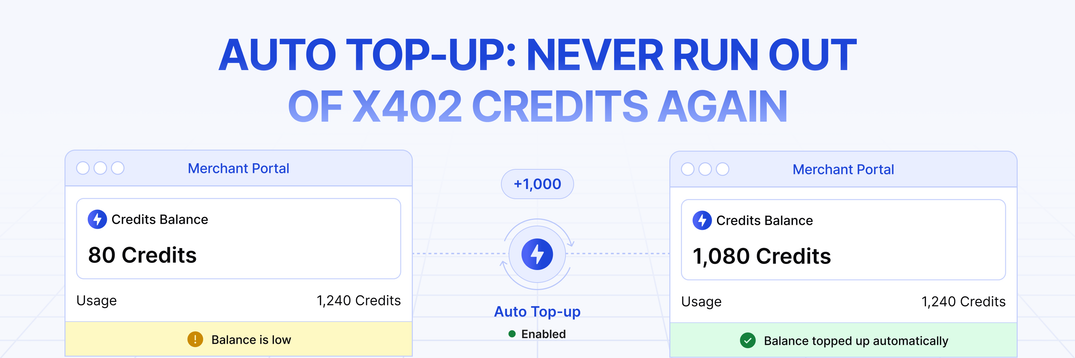
Recently, PayAI added Auto Top-Up to the merchant portal. Set a threshold and approve USDC spending to let PayAI attempt automatic credit refills on Solana or Base, without a card on file. Keep enough credits and USDC available for traffic spikes, scheduler delays and transaction failures.
Your agents run around the clock. Your credit balance shouldn't need a human watching it.
What We Shipped
- Automatic credit refills on two chains. Auto Top-Up works on Solana and Base, both in USDC. Pick the chain your treasury already lives on.
- You set the rules. Choose the balance that triggers a purchase and the dollar amount to buy each time. Both are editable whenever you want.
- One approval, then it's hands-off. You approve spending from your own wallet. Later purchases can run without another signature while the approval, funds and service remain available.
- We pay the gas on every refill. PayAI pays the network fee for automatic refill transfers. Wallet approval and revocation transactions can require gas from you.
- Runway warnings in the dashboard. The dashboard estimates runway from recent credit consumption and can show low-balance warnings. The estimate is not a prediction of future demand; sudden traffic spikes can consume the remaining balance sooner.
- Disable refills and revoke the approval. Disabling turns off future scheduled refills and attempts an on-chain revocation when the funding wallet is connected. If you reject the signature or the transaction fails, approval can remain; use the remaining-allowance control to revoke it. An already-started transfer may still complete.
- Guardrails you don't have to configure. The worker caps completed refills over the preceding 24 hours, pauses on missing allowance or repeated merchant-side failures, and records automatic purchases alongside manual ones. These are service controls, not an on-chain spending cap.
Why running out of credits is a 3am problem
For standard prepaid settlements, one credit covers one settlement. If paid credits and any applicable free allowance are exhausted, /settle can reject requests with insufficient_credits. Auto Top-Up reduces this risk but does not guarantee uninterrupted traffic.
Nobody schedules that moment. Agentic traffic isn't a nine-to-five workload — it spikes when your customers' agents decide to work, which is frequently at 3am on a Saturday. The balance that looked comfortable on Friday is gone by the weekend, and the first thing that tells you is your own error logs.
We've watched merchants hit this repeatedly. Not because they were careless — because manually monitoring a balance that's consumed by machines, at machine speed, is a job nobody should have.
Auto Top-Up reduces manual balance monitoring. It still depends on sufficient wallet funds, a valid approval and successful execution.
What automatic credit refills unlock
- Less manual refill work. Refills can run overnight and over weekends. Set a threshold that leaves room for a delayed or failed purchase; automation is not an uptime guarantee.
- Runway you can reason about. Set the threshold at whatever margin makes you comfortable — a day of traffic, a week — and let refills happen underneath it.
- Predictable spend, not surprise invoices. You choose the purchase size, and every refill is a discrete, itemized purchase in your history. Nothing is metered against you after the fact.
- A treasury workflow that fits crypto teams. USDC moves directly from your wallet to PayAI. No card, no bank rails, no third-party billing processor holding your payment method.
How to set up Auto Top-Up
Go to Buy Credits in the merchant portal and open the Auto Top-Up tab.
1. Pick your chain and your numbers. Solana or Base, the balance that should trigger a refill, and the dollar amount to buy each time.
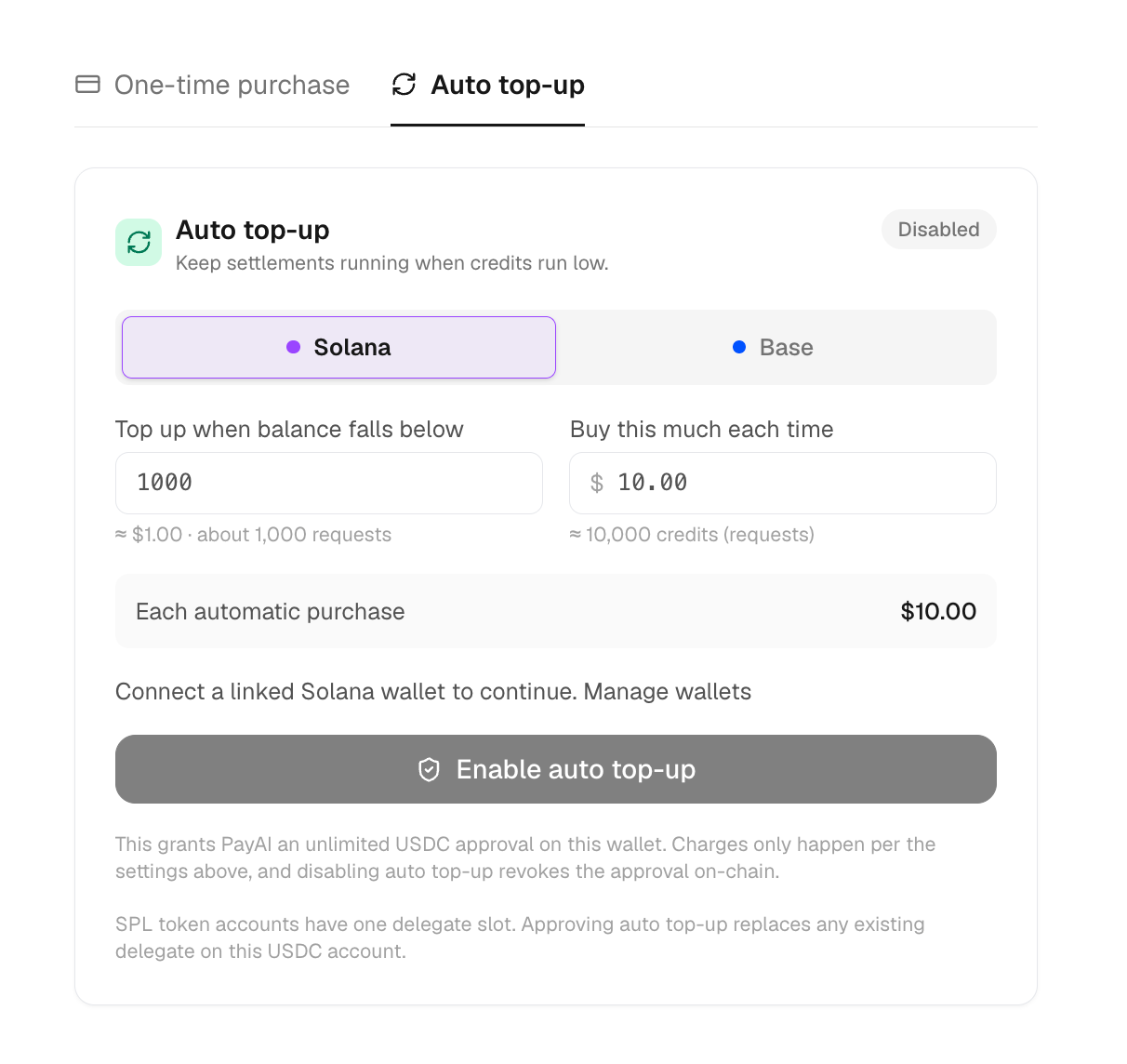
2. Sign one approval. Your wallet will ask you to approve USDC spending — an SPL delegate on Solana or an ERC-20 allowance on Base. Review the allowance before signing. Approval and later revocation transactions can require gas.
3. That's it. The card shows your settings, remaining approval and last refill. The scheduler runs every five minutes, but selection limits, pending purchases, RPC availability and transaction confirmation can delay the credit update. Five minutes is not a delivery guarantee.
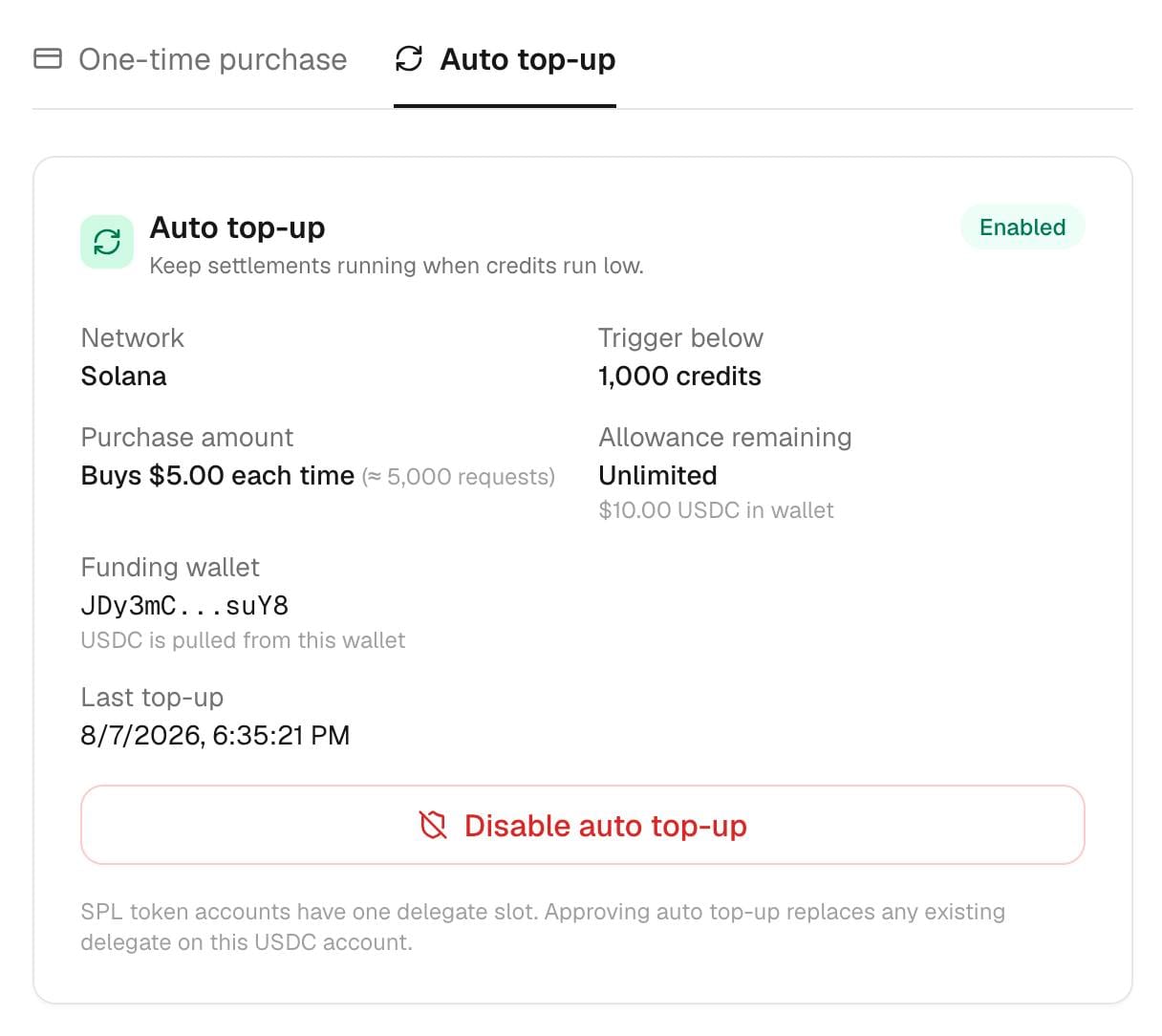
To stop, press Disable Auto Top-Up. The server disables future scheduled refills. If the funding wallet is connected, it also requests an on-chain revocation. Confirm that transaction and check the remaining allowance; a rejected or failed revocation leaves approval in place. Disabling cannot undo an already-started transfer.
Frequently asked questions
What exactly am I approving? The setup flow requests an unlimited USDC allowance or delegation to the configured PayAI signing address. Your threshold, purchase amount and daily cap are enforced by the PayAI service, not by that unlimited on-chain approval. Only approve a wallet and amount of exposure you are comfortable authorizing; you can revoke the allowance from your wallet.
Are my top-up settings an on-chain spending limit? No. The worker checks your threshold, purchase size and daily refill cap, but an unlimited allowance gives the approved signer broader on-chain authority. Disabling the service and revoking that allowance are separate actions. Disabling and re-enabling does not create a limited allowance; confirm a successful revocation if you want to remove the authority.
What if I revoke the approval myself? The next execution check detects an insufficient or missing allowance and disables Auto Top-Up. Credit refills stop until you restore a sufficient approval and re-enable the service. Already-submitted transfers need their own outcome check.
What if my wallet doesn't have enough USDC? The purchase is skipped and recorded. After a few consecutive failures, Auto Top-Up pauses itself so it isn't retrying against an empty wallet forever. Refill the wallet, re-enable, and you're going again.
Does the signing address ever hold my funds? The implemented refill transfer sends USDC from your wallet directly to PayAI’s receiving address; the initiating signer does not need to receive it first. The spending approval still grants that signer authority over the approved USDC allowance.
Can I still buy x402 credits manually? Yes. One-time purchases are unchanged, and they're still the default tab. Auto Top-Up sits alongside them, and automatic purchases show up in the same history with an "Auto" badge.
Should I choose Solana or Base for auto top-up? Use a supported chain where you hold USDC and can manage the approval. End-to-end refill time includes the scheduler, RPC requests, chain confirmation and credit update; do not treat a settlement benchmark as a refill guarantee. Our Flashblocks post explains the separate Base settlement path.
Auto Top-Up is live in the merchant portal for eligible prepaid accounts; enterprise postpaid accounts do not use Auto Top-Up. There is no separate automation surcharge. USDC credit purchases use the current USDC pricing whether manual or automatic.
New to x402? Start with the PayAI docs, or read why the machine economy needs agent-native payments.
If you're running agent traffic through x402 and you've ever been paged by your own error logs at an unreasonable hour, this one's for you.
Let's build.